
11
profiler-powered-by-scalene

Profiler Powered by Scalene: AI-Powered Python Profiling in Cursor

馃殌 Introduction Profiler Powered by Scalene is a VSCode/Cursor extension that brings the power of Scalene - an AI-powered CPU, GPU, and memory profiler for Python - directly into your editor. If you鈥檝e been looking for a professional-grade Python profiling solution that works seamlessly in Cursor, VSCodium, or other VS Code alternatives, this extension is for you. 馃 Why I Built This Extension As a Python developer using Cursor for my daily work, I encountered a frustrating limitation: the original Scalene VS Code Extension by Emery Berger is excellent, but it鈥檚 not available on Open VSX, which is the extension marketplace used by Cursor, VSCodium, and other open-source VS Code alternatives. ...
December 30, 2025 路 7 min 路 Carlo Bertini [WaYdotNET]
#automation #code analysis #debugging #performance #programming tools. #Python #software development #static analysis
11
minimal-git-file-history

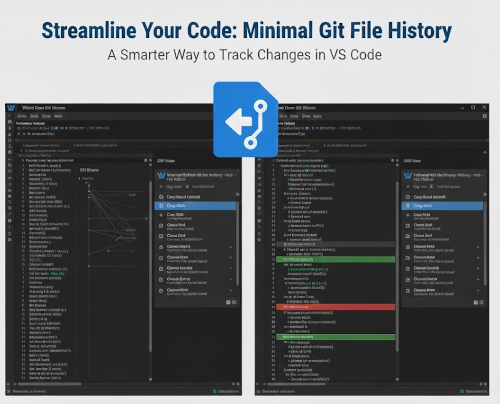
Minimal Git file history: Navigate Git History Like a Pro

馃殌 Introduction Minimal Git file history is a VSCode/Cursor extension that brings the powerful Git history navigation experience from JetBrains IDEs to Visual Studio Code and Cursor. If you鈥檝e ever missed the seamless way IntelliJ IDEA or PyCharm handle file history, diffs, and blame annotations, this extension is for you. 馃 Why I Built This Extension As someone who has worked extensively with both JetBrains IDEs and VSCode, I noticed a significant gap in the Git history navigation experience. While VSCode has several Git extensions available, none of them quite captured the intuitive and comprehensive approach that JetBrains IDEs offer. ...

November 4, 2025 路 5 min 路 Carlo Bertini [WaYdotNET]
#automation #code analysis #debugging #GitHub #git #programming tools. #software development #static analysis #tips
11

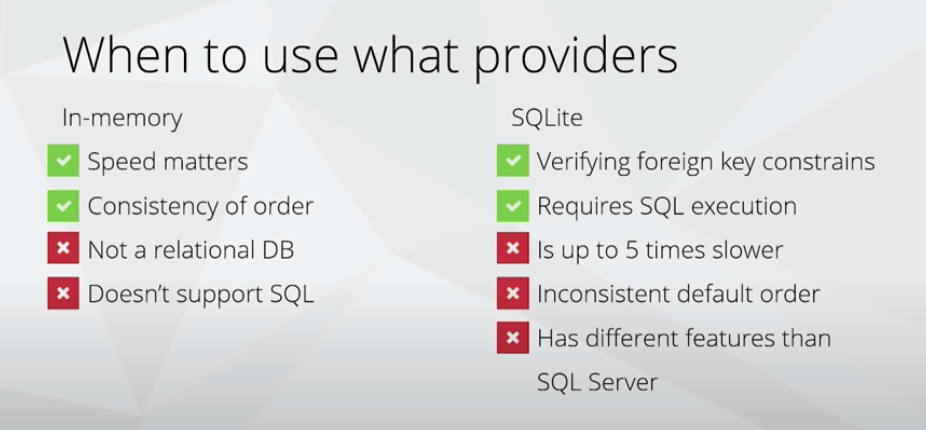
Use Sqlite Instead of Db in Memory to Verify Foreign Key

How to check check Constrains in test ? Todo: i need to insert some description :D When we need to check check, we need to use Sqlite provider When use providers: using System; using System.Threading.Tasks; using Bogus; using Microsoft.EntityFrameworkCore; using TrackingConsumerService.Data; using TrackingConsumerService.Data.Models; using Xunit; namespace TrackingConsumerService.Test.Fixture { public class DbContextFixture : IDisposable { public MyDbContest DbContext { get; private set; } public DbContextFixture() { var options = new DbContextOptionsBuilder<MyDbContest>() .UseSqlite("Filename=:memory:") .Options; DbContext = new MyDbContest(options); DbContext.Database.OpenConnection(); DbContext.Database.EnsureCreated(); } public void Dispose() { DbContext?.Database?.CloseConnection(); DbContext?.Dispose(); } } [CollectionDefinition("DbContext")] public class InMemoryDbContextFixtureCollection : ICollectionFixture<DbContextFixture> { // This class has no code, and is never created. Its purpose is simply // to be the place to apply [CollectionDefinition] and all the // ICollectionFixture<> interfaces. } } todo: add test example ...

June 15, 2024 路 1 min 路 Carlo Bertini [WaYdotNET]
#csharp #dotnet